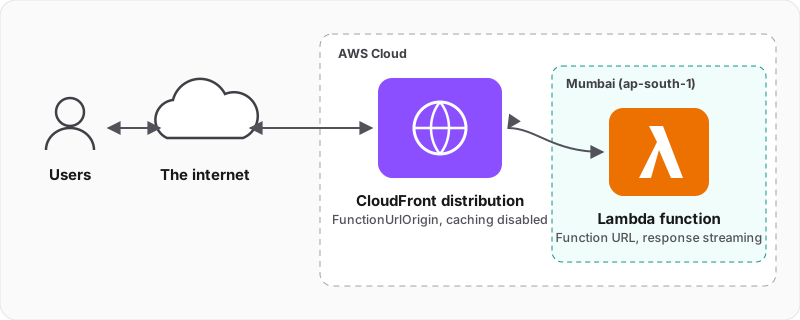
Update, October 2026: two things have changed since I wrote this. The
nodejs20.xLambda runtime stopped receiving security patches on 30 April 2026, so useRuntime.NODEJS_24_Xfor new functions. And CloudFront now supports Origin Access Control for function URLs:FunctionUrlOrigin.withOriginAccessControl(fnUrl)withauthType: FunctionUrlAuthType.AWS_IAMlets only your distribution invoke the URL, which is the production answer to theNONEauth type I warn about in the tips below. Check that the function's resource policy grants CloudFront bothlambda:InvokeFunctionUrlandlambda:InvokeFunction; at the time of this update the CDK only adds the first.
Preface#
So, one of my friends who works extensively with the CDK asked me whether I had attempted to use a lambda function accessible via a function URL with a CloudFront distribution.
His primary objectives were to use custom domains and customise caching behaviour from the origin (the function URL in this case). When he was attempting this PoC, the CDK didn't have a FunctionUrlOrigin and he instead had to try implementing this using HttpOrigin. Unfortunately, he wasn't able to get it to work then.
Today, I had an impulse to check out whether this was possible, so I went on an R&D frenzy to get it working. Here's how I did it.
The Journey#
1. Create a CDK project#
Create a CDK TypeScript project in an empty directory using:
npx cdk init app --language typescript2. Create the function URL stack#
Create a stack for the Lambda function that's accessible using a function URL at lib/fnurl-stack.ts. Notice the invokeMode property which is set as RESPONSE_STREAM; this configures the function's runtime and enables response streaming.
import { Stack, StackProps, Duration, CfnOutput } from 'aws-cdk-lib/core';
import { FunctionUrl, Runtime, FunctionUrlAuthType, InvokeMode } from 'aws-cdk-lib/aws-lambda';
import { NodejsFunction } from 'aws-cdk-lib/aws-lambda-nodejs';
import { Construct } from 'constructs';

export class FnUrlStack extends Stack {
  fnUrl: FunctionUrl;

  constructor(scope: Construct, id: string, props?: StackProps) {
    super(scope, id, props);

    const fn = new NodejsFunction(this, 'StreamingResponseFn', {
      runtime: Runtime.NODEJS_20_X,
      entry: 'functions/streaming-response-test.ts',
      timeout: Duration.minutes(5),
    });

    this.fnUrl = fn.addFunctionUrl({
      authType: FunctionUrlAuthType.NONE,
      invokeMode: InvokeMode.RESPONSE_STREAM,
    });

    new CfnOutput(this, 'Lambda FnURL Endpoint', {
      value: this.fnUrl.url
    });
  }
}3. Install esbuild#
Since I want to use local bundling, I'll install esbuild as a dev-dependency.
npm i -D esbuild4. Write the streaming handler#
Now, let's write the Lambda handler functions/streaming-response-test.ts and make it handle returning a response stream.
import type { APIGatewayProxyEventV2, Context, Handler } from "aws-lambda";
import { promisify } from "node:util";
import { Writable, Readable, pipeline as streamPipelineFn } from "node:stream";

declare global {
  namespace awslambda {
    export namespace HttpResponseStream {
      function from(writable: Writable, metadata: any): Writable;
    }

    export type ResponseStream = Writable & {
      setContentType(type: string): void;
    }

    export type StreamifyHandler = (event: APIGatewayProxyEventV2, responseStream: ResponseStream, context: Context) => Promise<any>;

    export function streamifyResponse(handler: StreamifyHandler): Handler<APIGatewayProxyEventV2>;
  }
}

const createRange = (start: number, end: number) => {
  const range = [];
  for (let i = start; i <= end; i++) {
    range.push(i);
  }
  return range;
};

const pipeline = promisify(streamPipelineFn);

const txtData = createRange(1, 1000000).join(', ');

export const handler = awslambda.streamifyResponse(async (_event, responseStream): Promise<any> => {
  const requestStream = Readable.from(Buffer.from(txtData));
  await pipeline(requestStream, responseStream);
});5. Create the CloudFront distribution stack#
Next, let's create the stack lib/dist-stack.ts for the CloudFront distribution. Notice how we set the cachePolicy to CACHING_DISABLED. This is to ensure that we always forward the request to the origin and get an up-to-date response every time, while we're developing our solution.
I have an inkling that my friend possibly missed this cachePolicy configuration while he was attempting his implementation.
import { StackProps, Stack, CfnOutput } from 'aws-cdk-lib/core';
import { Distribution, CachePolicy, HttpVersion } from 'aws-cdk-lib/aws-cloudfront';
import { FunctionUrlOrigin } from 'aws-cdk-lib/aws-cloudfront-origins';
import { FunctionUrl } from 'aws-cdk-lib/aws-lambda';
import { Construct } from 'constructs';

interface DistStackProps extends StackProps {
  fnUrl: FunctionUrl;
}

export class DistStack extends Stack {
  constructor(scope: Construct, id: string, props: DistStackProps) {
    super(scope, id, props);

    const cdnDistribution = new Distribution(this, 'CloudfrontDist', {
      defaultBehavior: {
        origin: new FunctionUrlOrigin(props.fnUrl),
        cachePolicy: CachePolicy.CACHING_DISABLED,
      },
      enableLogging: true,
      httpVersion: HttpVersion.HTTP2_AND_3,
      enableIpv6: true,
    });

    new CfnOutput(this, 'Distribution Domain Name', {
      value: cdnDistribution.domainName
    });
  }
}6. Wire the stacks together#
Finally, let's wire up the stacks in the CDK app's entry point bin/main.ts. Here we instantiate our stacks, get the function URL reference from fnurl-stack.ts and pass it to dist-stack.ts as a prop.
#!/usr/bin/env node
import 'source-map-support/register';
import * as cdk from 'aws-cdk-lib';
import { FnUrlStack } from '../lib/fnurl-stack';
import { DistStack } from '../lib/dist-stack';

const app = new cdk.App();
const fnUrlStack = new FnUrlStack(app, 'FnUrlStack');
new DistStack(app, 'DistStack', { fnUrl: fnUrlStack.fnUrl });7. Deploy#
Once all of this is done, just deploy the app using:
npx cdk deploy --allThe deployment takes around 5 minutes and once it's completed you get some outputs from the CDK CLI which contain the URL for the Lambda function and the domain name of the CloudFront distribution.
✅  FnUrlStack

✨  Deployment time: 41.57s

Outputs:
FnUrlStack.ExportsOutputFnGetAttStreamingResponseFnFunctionUrl3079B143FunctionUrl68DAFEE3 = https://xxxxx7ybnafkqxxxxxvalm0xxxxx.lambda-url.ap-south-1.on.aws/
FnUrlStack.LambdaFnURLEndpoint = https://xxxxx7ybnafkqxxxxxvalm0xxxxx.lambda-url.ap-south-1.on.aws/
Stack ARN:
arn:aws:cloudformation:ap-south-1:xxxxxxxxx:stack/FnUrlStack/saaed23-d74c-11ee-xxxx-xxxxxxx

✅  DistStack

✨  Deployment time: 270.14s

Outputs:
DistStack.DistributionDomainName = xxdfwedwedxxx.cloudfront.net
Stack ARN:
arn:aws:cloudformation:ap-south-1:xxxxxxxxx:stack/DistStack/sdf33r3-d74c-11ee-xxxx-xxxxxxx

✨ Total time: 272.63sA deployable CDK sample application can be found here: ashishpandey001/cdk-cloudfront-lambda-streaming.
Tips#
- When working with CloudFront, first get the origin working directly. So, in our case, we should first get the
FnUrlStackdeployed and test the endpoint using the function URL directly. - The function URL here uses the
NONEauth type; you don't want to do that in production. - CloudFront supports logging requests. If you're stuck, enable logging: that creates an S3 bucket which stores your request logs and helps you debug potential issues, especially those around origin selection and caching behaviours.
- The Lambda function used here was a basic function. When using function URLs with CloudFront, you can opt for a Lambdalith design pattern if you want to deploy an application that deals with different cache behaviours for different requests. CloudFront is extremely configurable.
- The primary advantage of a streaming response is to reduce the time to first byte (TTFB), not your function's execution time. Streaming responses can increase the function's execution time due to the nature of how streaming systems work.
This is my first attempt at writing about technology and I'd appreciate any constructive feedback and questions regarding this topic. Thank you for the read!
Here's an article by Shivam, another AWS pro from my network. It details the conceptual nuances and shows you how to accomplish the same result using the AWS console.